Gitlab CI/CD
Gitlab 安装
官方docker 安装
将 gitlab, nginx, postgres, redis 都运行在一个镜像中
- 拉取gitlab-ce镜像
- 将 GitLab 的配置 (etc) 、 日志 (log) 、数据 (data) 放到容器之外, 便于日后升级, 因此请先准备这三个目录。
- 启动镜像,需要建立端口映射,8090和22是容器内gitlab的http和ssh的端口
docker run \
    --detach \
    --publish 8090:8090 \
    --publish 222:22 \
    --name gitlab \
    --restart unless-stopped \
    -v /mnt/gitlab/etc:/etc/gitlab \
    -v /mnt/gitlab/log:/var/log/gitlab \
    -v /mnt/gitlab/data:/var/opt/gitlab \
    gitlab/gitlab-ce
- 配置 gitlab
gitlab上创建项目的时候,生成项目的URL访问地址是按容器的
hostname来生成的,也就是容器的id。作为gitlab 服务器,我们需要一个固定的 UR L访问地址,于是需要配置gitlab.rb(宿主机路径:/mnt/gitlab/etc/gitlab.rb)
# 配置http协议所使用的访问地址,不加端口号默认为80
external_url 'https://192.168.199.231:8090'
# 配置ssh协议所使用的访问地址和端口
gitlab_rails['gitlab_ssh_host'] = '192.168.199.231'
gitlab_rails['gitlab_shell_ssh_port'] = 222 # 此端口是run时22端口映射的222端口

#保存配置文件并退出
:wq
- 重启gitlab容器
docker restart gitlab
FAQ
GitLab 访问返回 502
gitlab-ctl status 查看对应的服务,是否有不停重启的服务,进而查看服务日志。
unicorn一直重试,
- 端口问题,改unicorn端口,再对gitlab重启;
- 没有明显原因,则排查资源问题(CPU和内存);
- 尝试
docker exec -it gitlab rm /opt/gitlab/var/unicorn/unicorn.pid && docker restart gitlab
https://forum.gitlab.com/t/error-502-failed-to-start-a-new-unicorn-master/29790
三方docker安装
https://github.com/sameersbn/docker-gitlab
拆分为 gitlab, postgres, redis 三个镜像,通过 docker compose 启动;
操作命令
docker容器安装gitlab时,需要先进入到容器中
docker exec -ti gitlab /bin/bash
- 重新应用gitlab的配置
gitlab-ctl reconfigure
- 重启gitlab服务
gitlab-ctl restart
- 查看gitlab运行状态
gitlab-ctl status
- 停止gitlab服务
gitlab-ctl stop
- 查看gitlab运行日志
gitlab-ctl tail
- 停止相关数据连接服务
gitlab-ctl stop unicorn
gitlab-ctl stop sideki
Gitlab CI
Runner
Docker-Runner
Gitlab-runner 安装:更好的管理方式是k8s
- 拉取镜像
- 启动gitlab-runner
docker run -d --name gitlab-runner --restart always \
    -v /mnt/gitlab-runner/config:/etc/gitlab-runner \
    -v /var/run/docker.sock:/var/run/docker.sock \
    gitlab/gitlab-runner
- 注册到gitlab,根据gitlab admin中的runner的信息,填写以下信息
docker run --rm -t -i -v /mnt/gitlab-runner/config:/etc/gitlab-runner gitlab/gitlab-runner register \
  --non-interactive \
  --url "http://172.16.1.181:8090/" \
  --registration-token "DA1wNdAchnBFH_frXa9N" \
  --executor "docker" \
  --docker-image alpine:latest \
  --description "docker-runner" \
  --tag-list "docker,test"
如果出现了no route to host异常,需要在宿主机上添加端口防火墙(原因见docker章节No Route to Host 问题)
K8s-Runner
Helm 安装:GitLab Runner Helm chart | GitLab Docs
.gitlab-ci.yml 配置
需要在项目中创建 .gitlab-ci.yml 文件,下面是个示例,其中tags是创建gitlab-runner时指定的tags,匹配上才会有runner执行CI:
image: maven:latest
stages:
  - build
  - test
  - run
variables:
  MAVEN_OPTS: "-Dmaven.repo.local=.m2/repository"
cache:
  paths:
    - .m2/repository/
    - target/
build:
  stage: build
  script:
    - mvn $MAVEN_CLI_OPTS compile
  only:
    - master
  tags:
    - test
test:
  stage: test
  script:
    - mvn $MAVEN_CLI_OPTS test
  only:
    - master
  tags:
    - test
deploy:
  stage: deploy
  script:
    - echo "deploy over..."
  only:
    - master
  tags:
    - test
- Pipeline:相当于一次构建任务,里面可以包含多个流程,如安装依赖、运行测试、编译、部署测试服务器、部署生产服务器等。
- 任何提交或者 Merge Request 的合并都可以触发 Pipeline 构建;
- Stages:表示一个构建阶段。一次 Pipeline 中可定义多个 Stages
- 所有 Stages 会顺序运行,即当一个 Stage 完成后,下一个 Stage 才会开始
- 只有当所有 Stages 完成后,该构建任务才会成功
- 如果任何一个 Stage 失败,那么后面的 Stages 不会执行,该构建任务失败
Pipeline
Branch pipelines that run for Git push events to a branch, like new commits or tags.
Tag pipelines that run only when a new Git tag is pushed to a branch.
Merge request pipelines that run for changes to a merge request, like new commits or selecting the Run pipeline button in a merge request’s pipelines tab.
Scheduled pipelines.
| Variables | Branch | Tag | Merge request | Scheduled |
|---|---|---|---|---|
CI_COMMIT_BRANCH |
Yes | Yes | ||
CI_COMMIT_TAG |
Yes | Yes, if the scheduled pipeline is configured to run on a tag. | ||
CI_PIPELINE_SOURCE = push |
Yes | Yes | ||
CI_PIPELINE_SOURCE = scheduled |
Yes | |||
CI_PIPELINE_SOURCE = merge_request_event |
Yes | |||
CI_MERGE_REQUEST_IID |
Yes |
Jobs
表示构建工作,即某个 Stage 里面执行的工作。一个 Stage 中可定义多个 Jobs
-
默认,相同 Stage 中的 Jobs 会并行执行
-
相同 Stage 中的 Jobs 都执行成功时,该 Stage 才会成功
-
如果任何一个 Job 失败,那么该 Stage 失败,即该构建任务失败
可以通过needs字段改变执行顺序。
- 同一个stage的:job1 和 job2 是可以并行的。
- job1之后将会启动 job3 (立即执行, 不会等待job2完成作业)
- job2之后将会启动 job4 (立即执行, 不会等待job1完成作业)
stages:
    - stage-1
    - stage-2

job-1:
    stage: stage-1
    needs: []
    script:
      - echo "job-1 started"
      - sleep 5
      - echo "job-1 done"

job-2:
    stage: stage-1
    needs: []
    script:
      - echo "job-2 started"
      - sleep 60
      - echo "job-2 done"

job-3:
    stage: stage-2
    needs: [job-1]
    script:
      - echo "job-3 started"
      - sleep 5
      - echo "job-3 done"

job-4:
    stage: stage-2
    needs: [job-2]
    script:
      - echo "job-4 started"
      - sleep 5
      - echo "job-4 done"
variables
GitLab CI/CD 预先定义的变量:https://docs.gitlab.com/ee/ci/variables/predefined_variables.html
.gitlab-ci.yaml中定义变量:
- jobs 中定义
variables为{}表明不需要全局变量;
variables:
  GLOBAL_VAR: "A global variable"

job1:
  variables:
    JOB_VAR: "A job variable"
  script:
    - echo "Variables are '$GLOBAL_VAR' and '$JOB_VAR'"

job1:
  variables: {}
  script:
    - echo This job does not need any variables
将变量传递到其它job
create a new environment variables in a job, and pass it to another job in a later stage.
build-job:
  stage: build
  script:
    - echo "BUILD_VARIABLE=value_from_build_job" >> build.env
  artifacts:
    reports:
      dotenv: build.env

test-job:
  stage: test
  script:
    - echo "$BUILD_VARIABLE"  # Output is: 'value_from_build_job'
cache
https://docs.gitlab.com/ee/ci/caching/
cache是用来指定 jobs 之间可以缓存的文件和目录
-
Locally defined cache overrides globally defined options;
-
不同的
key下的缓存也不会相互影响; -
cache 在同一个项目的不同的 pipeline 之间也实现共享;
-
不同的项目不能共享 cache;
-
如果整个 pipeline 配置全局的 cache,意味着每个 job 在没有特殊配置的情况下会使用全局的配置
-
对整个 job 的 cache 禁用
默认的配置是 cache:policy 中的 pull-push 策略:
- pull:每个 job 会在开始执行前将对应路径的文件下载下来;
- push:任务结束前重新上传,不管文件是否有变化;
- 可以单独指定 pull 或者 push;
示例:maven项目配置缓存
image: nnntln/3.6.1-jdk-8:latest

variables:
   MAVEN_OPTS: -Dmaven.repo.local=/cache/maven.repository
cache:
   key: PortalReportBackend
   paths:
     - /root/.m2/repository

stages:
  - build
  - execute

build:
  stage: build
  script: /usr/lib/jvm/java-8-openjdk-amd64/bin/javac Hello.java
  artifacts:
    paths:
     - Hello.*

execute:
  stage: execute
  script: /usr/lib/jvm/java-8-openjdk-amd64/bin/java Hello
artifacts
Use artifacts to pass intermediate build results between stages.
- Subsequent jobs in later stages of the same pipeline can use artifacts.
- Different projects cannot share artifacts.
- Artifacts expire after 30 days by default. You can define a custom expiration time.
- The latest artifacts do not expire if keep latest artifacts is enabled.
- Use dependencies to control which jobs fetch the artifacts
artifacts is used to specify a list of files and directories which should be attached to the job when it succeeds, fails, or always.
The artifacts will be sent to GitLab after the job finishes and will be available for download in the GitLab UI.
- 默认30天有效期,可以指定
expire_in字段;
job artifacts
https://docs.gitlab.com/ee/ci/pipelines/job_artifacts.html
job 的制品,可以在 Pipeline界面进行下载
Keep artifacts from most recent successful jobs
By default artifacts are always kept for successful pipelines for the most recent commit on each ref.
- 最新的artifacts 不会受
expire_in字段影响;
Keep the latest artifacts for all jobs in the latest successful pipelines
By default the artifacts of the most recent pipeline for each Git ref are locked against deletion and kept regardless of the expiry time.
- 默认流水线的 artifacts 不受过期时间影响;
- 此设置优先于项目级别设置(Keep artifacts from most recent successful jobs)
Pipeline artifacts
Pipeline artifacts are different to job artifacts because they are not explicitly managed by .gitlab-ci.yml definitions.
Pipeline artifacts are used by the test coverage visualization feature to collect coverage information.
Gitlab Webhook
默认情况下
- 新建分支,会触发 pipeline(需要分析是否符合预期)
- push 时 total_commits_count 为0时,表示新建分支会触发 pipeline hook
- 1次 push webhook;
-
3次 pipeline webhook(pending -> running -> succeed)
-
open a MergeRequest 触发一次 webhook,action 为 opened, "merge_status": "preparing",
-
没有 pipeline id,此时只能生成链接,点击查看
-
approve a MergeRequest 触发一次 webhook, action 为 approved
-
merge Request 的时候,state 变成 merged ,action 为 merge
-
close merge request 时,state 变成 closed ,action 为 close
Gitlab CD
https://docs.gitlab.com/ee/topics/release_your_application.html
K8s Cluster
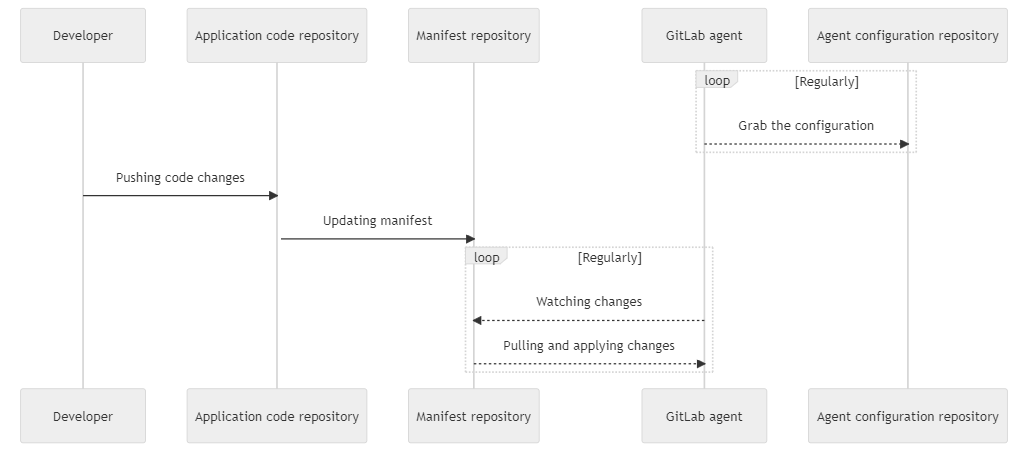
Gitops(Pull-Based)
https://docs.gitlab.com/ee/user/clusters/agent/gitops.html
- Moved from GitLab Premium to GitLab Free in 15.3
通过在 K8s 集群部署 Agent,监听
CI Push-Based
https://docs.gitlab.com/ee/user/clusters/agent/ci_cd_workflow.html
- Moved to GitLab Free in 14.5.
直接在.gitlab-ci.yml中选择Agent的K8s context 并运行 kubectl命令,部署到 K8s 环境
- 多环境支持不好;