[toc]
Jupyter-Hub
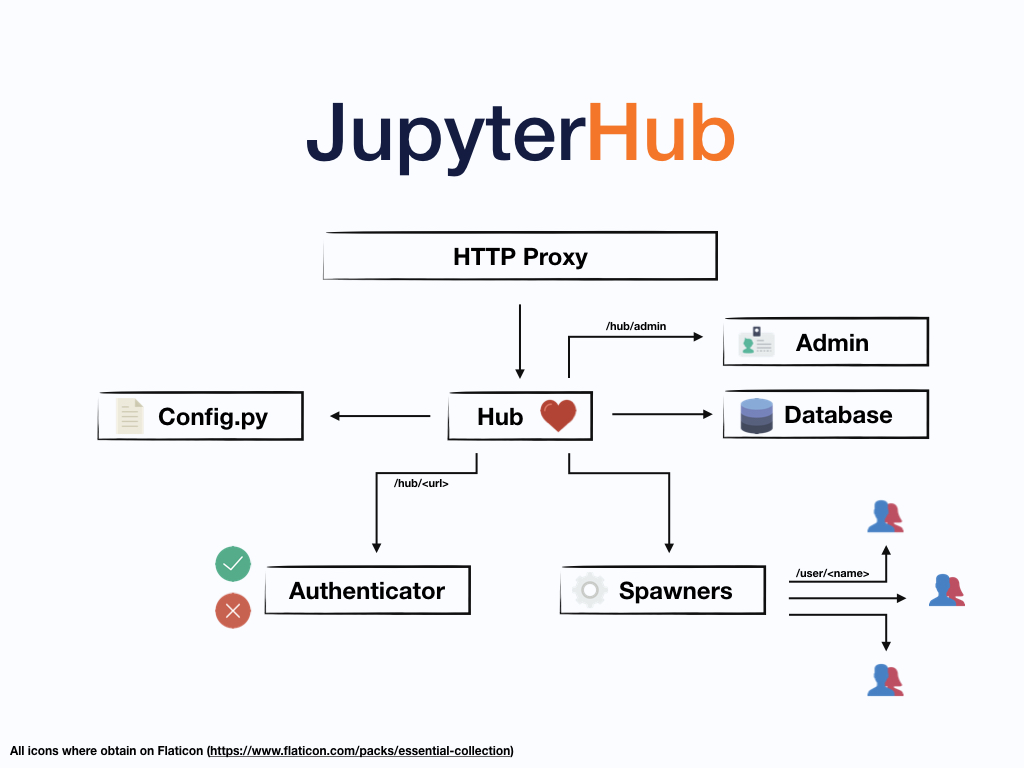
系统组件:
- a Hub (tornado process) that is the heart of JupyterHub
- a configurable http proxy (node-http-proxy) that receives the requests from the client’s browser
- multiple single-user Jupyter notebook servers (Python/IPython/tornado) that are monitored by Spawners
- an authentication class that manages how users can access the system
原理
启动jupyterlab时,如果用户不存在,默认是会创建?
Authenticator
默认使用PAMAuthenticator,用用户名和密码进行Linux系统用户认证。
LocalAuthenticator/PAMAuthenticator可以通过以下配置,允许自动创建系统用户:
Spawner
默认是LocalProcessSpawner,使用系统用户启动jupyter_labhub进程;
安装
Install JupyterHub and JupyterLab from the ground up
Custom Proxy
configurable-http-proxy (CHP)
In general, for a proxy to be usable by JupyterHub, it must:
- support websockets without prior knowledge of the URL where websockets may occur
- support trie-based routing (i.e. allow different routes on
/fooand/foo/barand route based on specificity) - adding or removing a route should not cause existing connections to drop
Optionally, if the JupyterHub deployment is to use host-based routing, the Proxy must additionally support routing based on the Host of the request.
Custom Authenticators
Custom Spawner
SystemdSpawner
- 支持cpu/memory配置:cgroup;
- 支持动态用户,不需要本地有对应的系统用户;(systemd 235以上)
- http://0pointer.net/blog/dynamic-users-with-systemd.html
- 配置状态存储的目录,保存会话状态
YarnSpawner
将spanwer启动在Yarn上。
- 用户创建问题:jupyterlab中的文件存储的路径?
-
代理用户机制:hadoop允许使用特定用户如'juyterhub'模拟任何用户;
-
状态存储问题:
-
jupyter-hdfscm 将 notebook 存储在HDFS上;
-
Python环境问题:
- 每个节点一样的Python环境;
- 或者Conda打包环境,上传到HDFS,然后作为Container资源被下载;